


.svg)






.svg.png)


.png)


.svg.png)

.png)


.png)




.svg)
The Lowdown 📋
Tool Summary
Basecamp is a project management and team collaboration platform where you organize work into projects, manage to‑dos, share files, communicate on message boards, and track progress so everything stays in one place instead of scattered across email and other tools. You can keep internal team work separate from client‑facing projects, and access everything through web, desktop, and mobile apps.
Vendor's Mission
We believe software is too complex. Too many features, too many buttons, too much to learn. Our products do less than the competition — intentionally. We build products that work smarter, feel better, allow you to do things your way, and are easier to use.
Best for 💪🏼

Available on 📱


Core Features ⚙️
Integrating your work and knowledge ecosystem directly into your communication hub makes it much easier to stay on top of tasks, notifications, and documents without switching between apps. This feature solves the common problem of scattered information and missed updates by bringing everything into the single place where you already collaborate with your team.
Stay in the Flow
With these integrations, you can automatically receive updates about tasks, see notifications, and access documents right inside your workspace. For example, when a new task is assigned to you or a shared document is updated, you’ll get an instant notification so you never miss important changes.
Benefits to Your Workflow
- Streamlined Processes: Reduce context switching and keep your team perfectly aligned.
- Time Savings: Spend less time hunting for information and more time high-value work.
- Instant Visibility: If a teammate updates a project document with new requirements, you see it immediately in your primary workspace and can take action right away.
Voice and video features let you connect with your team instantly for quick standups, project reviews, or co-working sessions right inside your chat tool. This means you don’t have to switch between different apps to talk things through or share updates. Everything happens in one place which maximizes operational efficiency because communication is faster and easier.
With this feature, you can start a voice or video call directly from your chat, join huddles, or open voice channels for ongoing conversations. It’s designed to help you solve problems on the spot, keep everyone in sync, and make remote teamwork feel more natural.
You’ll save time by avoiding long email threads or waiting for scheduled meetings. For example, if you need to quickly review a document with your team, you can jump into a voice channel, discuss changes, and get feedback in real time—all without leaving your workflow.
You can often customize how you use voice and video, whether you want open channels for anyone to join or private huddles for focused discussions. This flexibility helps you adapt the tool to fit your team’s style and needs.
Direct and group messaging is important because it lets you quickly connect with teammates without the delays and clutter of email. This feature solves the problem of slow communication and makes it easier to have focused conversations, whether you need to talk one-on-one or with a small group.
With this feature, you can start instant 1:1 chats or create group discussions for your team. It works by letting you send messages directly to others, so you can share updates, ask questions, or make decisions fast. Everything happens in real time, so you don’t have to wait for email replies.
Using direct and group messaging helps you keep conversations organized and separate from your inbox. It speeds up teamwork and makes sure everyone stays on the same page, especially when you need quick answers or want to avoid long email threads.
For example, if you’re working on a project and need to clarify a detail with a teammate, you can send them a direct message and get a response right away. Or, if your small team needs to discuss a task, you can start a group chat and everyone can share their thoughts instantly.
This feature is part of the Connection Hub, so you can easily integrate it with other tools you use. You can customize group chats for different teams or topics, making it flexible for any workflow.
Sharing files in chat is common, but finding them later can be a hassle. With this feature, you can share documents and assets directly in your chat, and then easily search for and retrieve them from your chat history whenever you need. This means you won’t waste time digging through old messages or asking teammates to resend files.
You simply upload or share a file in your chat. Later, when you need it, just use the search function to quickly find the file by name, type, or even keywords from the conversation. This keeps your workflow smooth and ensures important files are always at your fingertips.
For example, if you share a project brief in a team chat, anyone can later search for "project brief" or related terms and instantly access the document, even weeks later.
This feature is part of the Connection Hub, making it easy to manage and retrieve shared files across your workspace. It’s flexible, letting you search by different criteria, so you can adapt it to your team’s needs and never lose track of shared assets.
Keeping client-facing threads separate from internal ones helps you maintain clear boundaries, so sensitive or internal discussions don’t get mixed up with what clients see. This makes it easier to manage communication and avoid confusion or accidental sharing of private information.
With this feature, you can set up dedicated spaces or channels for your team’s internal conversations and different ones for client interactions. You decide where each conversation belongs, keeping everything organized and secure.
This approach streamlines your workflow by making sure everyone knows where to look for the right information. It also reduces the risk of mistakes, like sharing internal notes with clients.
For example, if you’re working with a client on a project, you can have one channel for all client updates and questions, and another just for your team to discuss strategy or issues. This keeps your client communications professional and your internal planning private.
You can customize these spaces to fit your needs—create as many as you want, set permissions for who can join, and adjust settings as your team or client list grows. This flexibility lets you adapt the setup as your business changes.
Controlling who can view or edit sensitive SOPs or client documents is key to keeping your information safe and organized. Without proper permissions, confidential data could be seen or changed by the wrong people, leading to mistakes or security risks.
With permissions and access control, you decide exactly who can see or edit each document. You can set rules so only certain team members can access sensitive files, while others have limited or no access. This helps you keep your data secure and ensures only the right people make changes.
This feature saves time and reduces errors by making sure everyone only works with the information they need. It also helps you meet privacy requirements and keeps your workflow smooth.
For example, you might let only managers edit client contracts, while the rest of the team can only view them. This way, important documents stay accurate and protected.
You can also customize permissions for different teams or projects, giving you flexibility as your needs change. Whether you need strict controls or more open access, you can adjust settings to fit your workflow.
Real-time collaborative editing lets you and your team work on the same document at the same time, so there’s no confusion about which version is the latest. This solves the problem of overlapping edits and lost changes that often happen when people send files back and forth.
With this feature, everyone sees updates instantly as they happen. You can type, edit, and comment together, just like in Notion, making teamwork smooth and fast. There’s no need to merge different versions or worry about missing someone’s input.
This makes your workflow more efficient because you spend less time tracking changes and more time getting work done. It’s especially useful for teams working on shared knowledge bases, project plans, or meeting notes.
For example, if you and your teammates are building a project plan, you can all add tasks, update deadlines, and leave comments in real time. Everyone stays on the same page, and you avoid duplicate work.
Advanced options might include setting permissions for who can edit or view, tracking changes, or integrating with other tools in your workspace. This flexibility lets you adapt the feature to fit your team’s needs.
Bringing embeds and rich media into your docs lets you keep everything you need, like Loom videos, Figma designs, and spreadsheets in one place. This means you don’t have to jump between different tools or tabs to find the latest information. Instead, you can make your doc the single source of truth for your team.
With this feature, you can directly add interactive assets to your pages. For example, you can drop a Figma prototype or a Google Sheet right into your doc, so everyone can view or interact with it without leaving the page. This keeps your work organized and up to date.
You’ll save time and reduce confusion because everyone knows where to look for the most current assets. It also helps with onboarding and collaboration, since all key resources are in one spot.
Imagine you’re working on a product launch: you can embed the latest design files, planning sheets, and feedback videos into a single doc. Your team can review, comment, and update everything from one place, making the process smoother and faster.
You can also customize which assets to embed, so your doc fits your workflow. Whether you need to show live dashboards, design files, or training videos, you can adapt the page to your needs.
Threaded channels help you keep conversations organized by topic or client, instead of having everything mixed together in one long, noisy chat. This means you can easily follow discussions that matter to you, without getting lost in unrelated messages.
With threaded channels, you can start a new thread for each topic or client. Each thread keeps all related messages together, so you can quickly find information or catch up on what you missed. This is especially useful if you work with multiple clients or teams, as it keeps your workspace tidy and focused.
Using threaded channels, you avoid confusion and save time searching for details. For example, if you support several clients, you can create a separate thread for each one. All messages, files, and updates for a client stay in their thread, making it easy to track progress and respond quickly.
Threaded channels can be customized to fit your needs. You can create threads for projects, clients, or any topic, and add or remove threads as your work changes. This flexibility helps you adapt as your team grows or your projects shift.
Keeping your documents organized is key to avoiding clutter and confusion, especially when working with many clients or projects. Structured organization using spaces, collections, or categories lets you group docs by client, project, or function, so you don’t end up with a messy, hard-to-navigate system like Google Drive can become.
With this feature, you can create clear sections for each client, project, or department. You simply assign docs to the right group, making it easy to find what you need and keep related information together. This helps everyone on your team know exactly where to look for specific files, reducing wasted time and mistakes.
For example, if you manage multiple clients, you can set up a space for each client and further organize their docs by project or topic. When someone needs a contract or a project brief, they just go to the right space and find it instantly.
You can also customize how you organize things—set up categories that match your workflow, rename collections, or create new spaces as your needs change. This flexibility means your system can grow and adapt with your business, keeping everything tidy and easy to manage.
Time tracking is essential for understanding where your time goes and making sure you get paid accurately for your work. It solves the problem of lost hours and unclear billing, helping you stay organized and accountable.
With this feature, you can track both billable and non-billable hours for each task or project. You simply log your time as you work, and the system keeps a record for invoicing and productivity analysis. This makes it easy to see how much time is spent on different activities and ensures nothing slips through the cracks.
By using time tracking, you improve your workflow by making billing straightforward and boosting productivity. You can quickly generate invoices based on tracked hours and identify areas where you might be spending too much or too little time.
For example, if you're working on a client project, you can log every hour you spend on specific tasks. When it's time to invoice, you have a clear record of billable hours, making the process fast and transparent for both you and your client.
This feature is flexible—you can track time for any type of work, separate billable from non-billable hours, and connect it to the Performance Hub for deeper insights. You can adapt it to fit your workflow, whether you work solo or as part of a team.
Reusable templates for pages and databases help you quickly standardize important documents like SOPs, client briefs, and content calendars. Instead of starting from scratch each time, you can duplicate a template, saving time and keeping things consistent across your team.
With this feature, you can set up templates for any repeatable process or document. When you need a new version, just copy the template and fill in the details. This keeps your workflows organized and reduces mistakes from missing steps or inconsistent formats.
For example, if you often create content calendars for different clients, you can make a master template. Each time you onboard a new client, duplicate the template, update the specifics, and you’re ready to go in minutes.
You can also customize templates to fit your team’s needs. Add sections, fields, or checklists that match your process. This flexibility means templates can adapt as your workflows change, making them useful for any team or project.
Linking databases and pages lets you connect related notes, clients, and projects so that updates in one place automatically show up everywhere they’re needed. This solves the problem of information getting out of sync across your workspace and saves you from having to update the same details in multiple spots.
With this feature, you can set up relationships between different types of information, like linking a client record to all their related projects or connecting meeting notes to specific tasks. When you update a linked item, those changes instantly appear in every connected page or database, keeping everything up to date.
This makes your workflow smoother and helps your team avoid mistakes caused by outdated info. For example, if you update a client’s contact details in one location, every project and note linked to that client will automatically reflect the new information. You don’t have to hunt down every place where the client is mentioned.
You can also customize how these links work, choosing which fields sync and how updates flow between databases or pages. This flexibility means you can adapt the system to fit your team’s needs, whether you’re managing projects, tracking clients, or organizing notes.
Automations and workflows are important because they help you avoid repetitive admin tasks that slow you down. Instead of manually assigning tasks, moving items between stages, or sending notifications, you can set up rules that do this work for you when certain conditions are met. This means you spend less time on routine steps and more time on work that matters.
With this feature, you can automatically assign tasks to the right people, move items through different stages of your process, and notify team members when something needs their attention. For example, if a task in your Performance Hub reaches a certain stage, it can be auto-assigned to the next team member and a notification can be sent out—no manual steps needed.
This makes your workflow smoother and helps your team stay on track without missing important updates. You can also customize these automations to fit your exact needs, choosing which actions happen and when, so the system adapts to your way of working.
Finding the right task or project quickly can be tough, especially when you have a lot going on. An AI-powered search makes it easy for you to locate exactly what you need, saving you time and reducing frustration. Instead of scrolling or guessing keywords, you can type natural questions or phrases, and the AI will understand and bring up the most relevant results.
With this feature, you can search across all your tasks and projects using everyday language. The AI can pick up on context, so even if you don’t remember the exact title or details, it still finds what you’re looking for. This means less time searching and more time getting things done.
For example, if you want to find all tasks related to "client feedback from last quarter," just type that in. The AI will pull up every related task and project, even if the wording isn’t an exact match.
You can also customize your searches by filtering for specific dates, assignees, or project types. The AI adapts to your needs, making it flexible whether you’re managing a small team or a large project portfolio.
Finding the right information quickly is essential when you’re working with a large knowledge base. A powerful search feature, especially one that uses AI, helps you instantly locate pages, docs, or notes by typing in keywords or even describing your intent. This means you don’t have to remember exact titles or where something is stored—just type what you need, and the system finds it for you.
With this feature, you can search across your entire Knowledge Hub, saving time and reducing frustration. It streamlines your workflow by making sure you always have the information you need at your fingertips, whether you’re preparing for a meeting, onboarding a new team member, or looking up past project notes.
For example, if you want to find all notes related to a specific client or project, you can simply type the client’s name or a related keyword. The search will instantly show you every relevant page, document, or note, even if you don’t remember where you saved them.
If AI is available, the search can understand your intent, not just the exact words you type. This means you can ask questions or describe what you’re looking for in plain language, and the system will interpret your request to deliver the best results. This adaptability makes the feature even more useful as your knowledge base grows and changes.
Having multiple work views like list, board, calendar, and Gantt lets you manage your work in the way that fits you best. Instead of being stuck with one layout, you can switch between views to see tasks as a simple list, a Kanban board, a calendar, or a timeline. This solves the problem of one-size-fits-all project management and helps you stay organized no matter how you like to work.
You can quickly move tasks between columns on a board, drag and drop deadlines on a calendar, or adjust timelines in a Gantt chart. Each view updates in real time, so you always see the latest changes. This flexibility means you can plan, track, and adjust your work without missing a beat.
For example, if you’re managing a product launch, you might use the board view to track progress, the calendar to schedule key dates, and the Gantt chart to map out dependencies. You can switch between these views as your needs change, making it easier to spot bottlenecks or overlaps.
You can also customize each view, filter tasks, group by assignee, or focus on specific priorities. This adaptability helps you and your team work the way you want, making it easier to hit your goals and keep everyone on the same page.
Custom fields let you add extra details to your tasks beyond just the basics like title, due date, or assignee. This means you can track things like client type, project phase, estimated hours, budget, or content status right inside your task list. You can then filter, sort, group, or report on your tasks using these fields, making it much easier to find exactly what you need.
With custom fields, you shape your system around your business instead of forcing your work into a generic setup. For example, if you're a solopreneur, you can quickly pull up all high-priority tasks for your Retainer clients or see every content piece scheduled for the week, removing the need for extra spreadsheets or separate tools.
Custom fields are flexible, so you can set them up to match your workflow, whether you need a lightweight CRM, a production tracker, or a pipeline manager. This adaptability helps you stay organized and focused on what matters most to your business.
Task dependencies and relationships help you keep your work organized by making it clear how tasks connect to each other. This feature solves the problem of missing steps or working out of order by letting you link tasks and set up rules like blocking, waiting on, or related to. You can connect tasks across different projects or lists, so you always know what needs to happen first and how changes in one place affect others.
With this feature, you can mark a task as "waiting on" another, so you don't start too soon. Visual indicators show you which tasks are connected, making it easy to see dependencies at a glance. You can also control how changes to dates or timelines update connected tasks, giving you flexibility to match your workflow.
For example, if you're launching a new product, you might set "Client Approval" to wait on "Design Mockups." This ensures the approval process only starts after the design is done, avoiding confusion or wasted effort.
You can customize how dependencies behave, so updates to one task can automatically adjust others. This helps you manage complex projects without missing steps or causing delays.
Task hierarchies (tasks, subtasks, lists) are essential for organizing your work efficiently. They help you break down complex projects into manageable pieces, ensuring nothing falls through the cracks. This structure simplifies planning and keeps your team aligned.
With task hierarchies, you can create parent tasks, subtasks, and group them into lists. Parent tasks act as the main goals, while subtasks handle the smaller steps needed to achieve them. Lists group related tasks, making it easier to track progress and maintain focus. You can also assign tasks to team members, set due dates, and track progress all in one place.
This feature streamlines project management by providing clarity and reducing overwhelm. It ensures everyone knows their responsibilities and how their work fits into the bigger picture, boosting productivity and collaboration.
For example, imagine you're launching a new product. The parent task could be "Product Launch," with subtasks like "Finalize design," "Prepare marketing materials," and "Coordinate launch event." Each subtask can have its own assignee, deadline, and checklist, keeping everything on track.
You can further customize task hierarchies by adding custom fields, tags, or dependencies to match your workflow. Whether you're managing a small team or a large project, this feature adapts to your needs, giving you full control over how you organize your work.
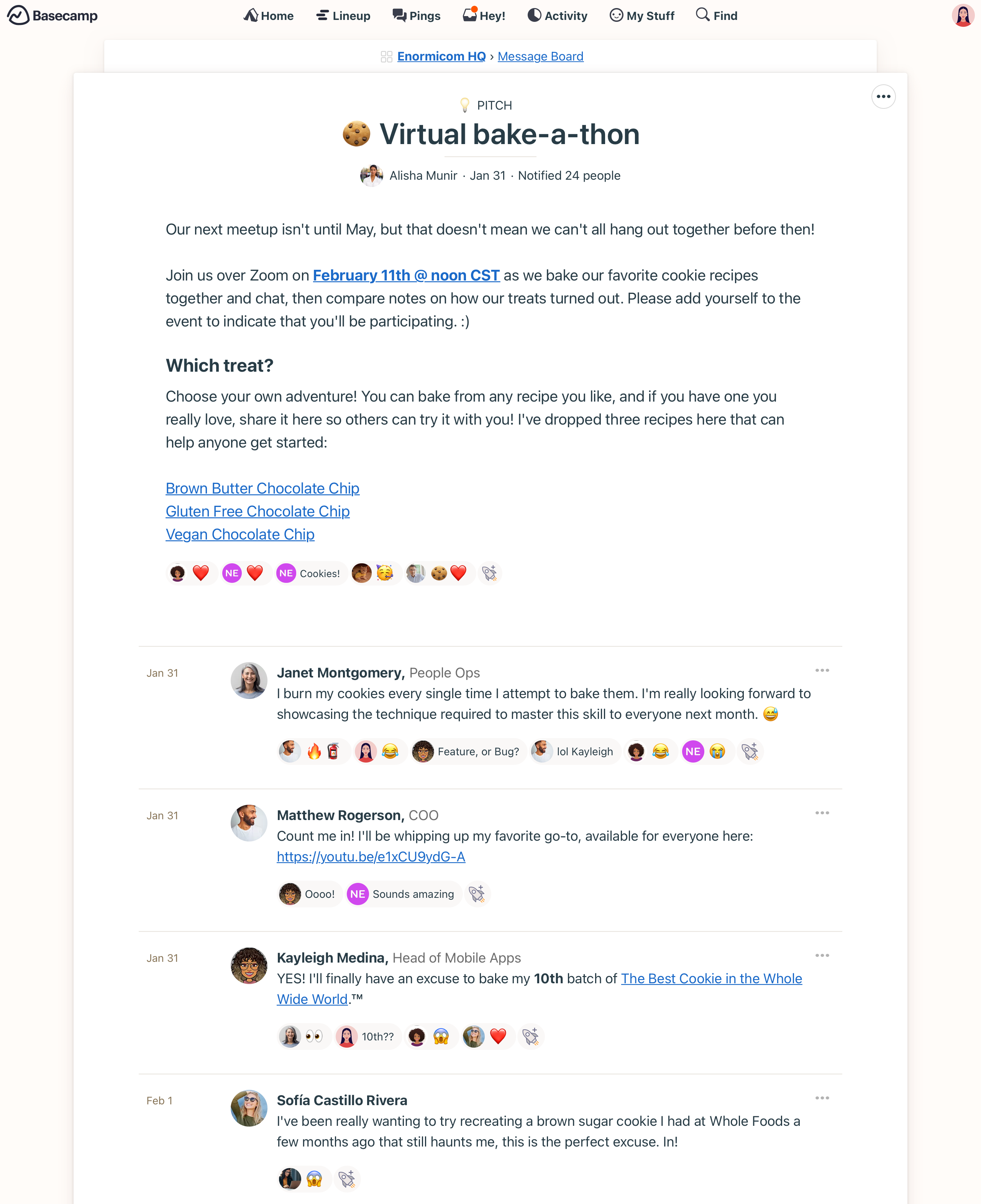
Product Screenshots 🖼️




Adopt 🐣
Usability
Basecamp uses a straightforward interface centered on project cards and simple navigation, making it easy for non‑technical teams to start managing work without extensive training. Core features like to‑do lists, message boards, docs, and schedules live inside each project, so you do not need to hunt across different tabs or modules to find context. The simplicity can feel limiting if you need advanced views like Gantt charts or custom dashboards, but for teams prioritizing clarity over complexity, Basecamp delivers a calm, focused experience.
Onboarding
You can create an account, start a new project, and invite team members in a few minutes using guided prompts that walk you through adding to‑dos, docs, and schedules. Basecamp's "My Stuff" dashboard consolidates everything assigned to you across projects, which helps new users see their responsibilities immediately. The learning curve is gentle because each project follows the same structure, so once you understand how to‑dos, message boards, and the hill chart work in one project, you can apply that knowledge everywhere.
From the vendor


Customize 🎨
Structure
Basecamp organizes work into projects, with each project containing to‑do lists, message boards, docs and files, a schedule, and a Campfire chat. The hill chart provides a visual way to track progress on tasks as they move from figuring things out to getting things done, giving managers a bird's‑eye view of momentum. Mission Control consolidates all project progress needles into a single dashboard, so you can monitor multiple projects at a glance without digging into each one individually.
Tailoring
You can tailor Basecamp by choosing which tools to enable for each project, customizing to‑do templates, and structuring message boards and docs to match your team's workflows. While the platform does not offer deep visual customization or custom fields, you can adapt how you use to‑dos, schedules, and boards to support different processes such as client delivery, product launches, or recurring operations. The Admin Pro Pack provides greater control over access and permissions, helping larger teams enforce structure and governance.
Connect 🖇️
Add-ons
Basecamp itself is a bundled suite of project tools rather than a platform with separate add‑ons, so features like docs, chat, scheduling, and file storage are all included in the core product. Third‑party apps extend Basecamp's capabilities, with popular add‑ons including time tracking, task automation, workflow sync, and recurring to‑do helpers. These integrations fill functional gaps, especially around advanced task management, time tracking, and cross‑platform syncing, without cluttering the core Basecamp experience.
Integrations
Basecamp integrates with tools like Zapier, Slack, Google Chat, time trackers, and other productivity platforms so you can automate workflows and keep updates flowing between systems. Integration apps such as Unito, Field Trip, and To‑do Helpers sync tasks, share activity updates, and automate recurring to‑dos, which reduces manual work. The Basecamp API supports custom integrations and reporting, enabling technical teams to connect to internal tools or pull data into advanced analytics platforms.
Scale 🚀
Performance
Basecamp is cloud‑based and runs reliably across web, desktop, and mobile with 99.99% historical uptime. Reviews describe the platform as stable and responsive for typical project tracking and team communication, with instant syncing across devices so updates appear immediately for all collaborators. The main performance critique centers on limited reporting and analytics rather than speed or reliability, with reviewers noting that basic activity tracking and mission control may not offer the depth needed for data‑driven decision making.


